You can automate large parts of operations with multi-agent AI systems—specialist agents that research, call tools, hand work to each other, and pause for human approval on risky steps. The goal is not a single chatbot that “does everything.” The goal is a closed loop: monitor signals, decide next actions, execute through your systems, and report outcomes.
This article shows how that works in practice for lead generation, backend opportunity management, and agency ad operations—plus a blueprint you can use to design the first workflow without pretending every step should be fully unsupervised.
Key takeaways
-
Automate workflows, not job titles. Map a repeatable process first, then assign agents to each stage with clear tools and outputs.
-
Use specialists with orchestration. Modern agent platforms support handoffs and manager-style “agents as tools,” so one agent can research while another drafts, another updates CRM, and another reports.
-
Keep humans on irreversible actions. Sending outreach, changing ad budgets, or moving pipeline stages typically needs approval gates until evidence is strong.
-
Measure completion, not cleverness. Track cycle time, conversion rate, error rate, and hours saved—not how “agentic” the demo feels.
What “fully automate” should mean in operations
In operations, full automation usually means the routine path runs without staff babysitting every click—while exceptions and high-risk writes still surface to a person. OpenAI’s agent guidance frames agents as systems that use tools, take actions in external systems, and stay inside guardrails. Orchestration patterns then decide whether a specialist takes over (handoff) or a manager agent calls specialists as bounded tools.
That distinction matters for business design. Lead research, draft generation, and reporting are excellent candidates for continuous automation. Budget increases, customer emails, and CRM stage changes often start as “agent prepares, human ships.”
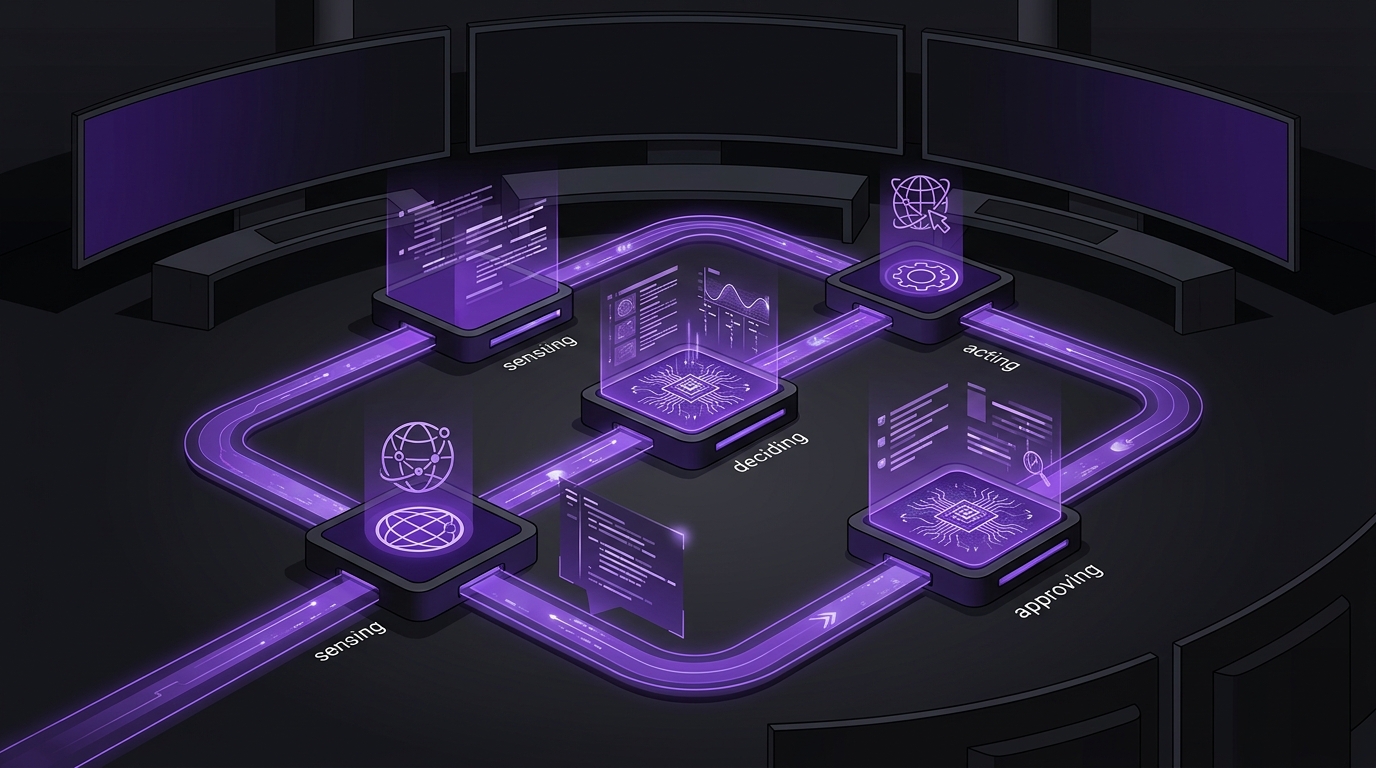
The Closed-Loop Ops Agent Stack
Use this five-layer stack for any operations workflow you want to automate:
-
Sense: Agents pull signals from CRM, ads platforms, forms, calendars, helpdesk, or analytics APIs.
-
Decide: A triage or manager agent scores priority and chooses the next workflow branch.
-
Act: Specialist agents call tools—enrich accounts, draft assets, update records, pause/enable campaigns.
-
Approve: Guardrails and human review block irreversible actions until policy allows auto-send.
-
Learn: A reporting agent logs outcomes, compares against targets, and feeds the next cycle.
If any layer is missing, the system tends to become either a passive dashboard or an unsupervised script that creates cleanup work.
Use case 1: Lead gen — research briefs for appointment-setting email
A common bottleneck is not “writing emails.” It is preparing enough context to make the first message relevant. A multi-agent lead-gen workflow can look like this:
-
Source agent: Pulls new leads from forms, LinkedIn exports, or CRM inbound queues.
-
Research agent: Enriches company size, service fit, recent news, tech stack clues, and likely pain points via approved tools.
-
Briefing agent: Produces a custom report for the appointment setter—ideal angle, proof points, objections, and a recommended first email draft.
-
CRM agent: Writes notes, tags ICP fit, and schedules a follow-up task.
-
Approval gate: A human (or a strict policy later) approves sends before anything leaves the mailbox.
The output that matters is the custom appointment-setting brief—not a generic template. A setter should open one report and know why this lead is worth a call, what to say, and what evidence to cite. That is multi-step agent work with tools and memory, not a website chat widget.
Hypothetical example: B2B home-services lead desk
A hypothetical regional contractor gets 40 commercial inquiries a week. Before agents, setters spent 12–15 minutes researching each lead. After a closed-loop stack, the research and brief agents deliver a one-page report in under two minutes; setters only review, personalize the last line, and send. Booked-call rate typically becomes the success metric—not “emails generated.”
Use case 2: Backend ops — monitor, optimize, and ship opportunities
Many teams lose deals in the middle of the pipeline: stale stages, missing owners, incomplete proposals, or opportunities that never get a next action. An opportunity operations agent stack can run continuously:
-
Monitor agent: Scans CRM for stalled deals, missing fields, approaching close dates, and SLA breaches.
-
Diagnosis agent: Classifies the issue—no next step, wrong owner, pricing gap, or low engagement.
-
Optimization agent: Drafts the next action: call script, proposal outline, discount request package, or internal escalation note.
-
Shipping agent: Creates tasks, updates stage suggestions, and prepares customer-facing drafts for approval.
-
Reporting agent: Publishes a daily “opportunity health” digest with what moved, what is blocked, and who owns the unblock.
This is where manager-style orchestration helps. A manager agent can keep ownership of the opportunity plan while calling research, drafting, and CRM specialists as tools—matching the pattern OpenAI documents for stable outer workflows with nested specialists.
Use case 3: Agencies — automate ad optimization and reporting
Agency operators often drown in account checks and client reporting. A multi-agent media workflow can cover the repetitive loop:
-
Ingest agent: Pulls spend, CPA, ROAS, search terms, creative fatigue signals, and conversion quality from ad platforms and analytics.
-
Optimization agent: Flags underperforming ad groups, proposes negatives, budget shifts, and creative tests against pre-agreed rules.
-
Execution agent: Applies low-risk changes automatically (for example, adding exact negatives already on an approved list) and queues higher-risk changes for strategist approval.
-
Reporting agent: Builds client-ready narratives: what changed, why, what to watch next week, and where human judgment is still required.
Agencies that do this well typically automate evidence gathering and first-draft recommendations first. They do not hand full budget control to an unsupervised agent on day one. Guardrails and human review—explicit concepts in agent platforms—belong in the same design as the tools.
Decision matrix: what to automate first
|
Workflow stage |
Automate early |
Keep human approval longer |
|
Lead gen |
Research, ICP scoring, appointment briefs, CRM notes |
First outbound email and meeting booking commitments |
|
Opportunity ops |
Stall detection, task creation, draft next steps, digests |
Stage changes, discounting, customer-facing proposals |
|
Agency ads |
Pull metrics, anomaly flags, approved-list negatives, report drafts |
Budget increases, new campaigns, broad match expansion |
Implementation steps that hold up in production
-
Pick one revenue-adjacent workflow with clear volume—lead briefs, stalled deals, or weekly ad reporting.
-
Write the specialist contracts: instructions, tools, outputs, and when another agent should take over.
-
Connect tools with least privilege—read-only first, then limited writes, then broader execution.
-
Add guardrails and approval pauses for anything customer-facing or spend-changing.
-
Evaluate with a golden set of real cases before expanding automation coverage.
-
Widen the loop only after completion rate and error rate are acceptable for two or more review cycles.
OpenAI’s orchestration guidance is practical here: start with one agent when you can, and add specialists only when the contract truly changes—different tools, different policy, or clearer traces. Splitting too early creates more prompts without better outcomes.
Limitations and failure patterns
-
Automating a messy CRM. Agents amplify bad stages and empty fields. Clean the data contract first.
-
Skipping the brief and jumping to blast email. Volume without relevance usually damages reply rates.
-
Letting an ad agent move budgets without policy. Optimization without constraints becomes random walk spend.
-
No audit trail. If you cannot explain why an agent recommended an action, operators will not trust the system.
-
Confusing chatbots with ops automation. Answering FAQs is not the same as monitoring pipelines and shipping next actions. For that distinction, see our earlier guide on when a chatbot is enough versus a production agent.
What to do next
-
Choose one of the three use cases above—lead briefs, opportunity health, or ad reporting.
-
Draw the Closed-Loop Ops Agent Stack for that workflow on one page.
-
List the tools each specialist needs and which actions require approval.
-
Pilot with a golden set of 20–50 real cases before expanding.
If you want a partner to map Multi-Agent Workflows and deliver production agents with tools, memory, and multi-step execution, Oasbit’s AI agent development services are built for that research-then-build path. Agencies and growth teams that also need paid media execution can pair this with our digital advertising services.
Want help designing the first closed-loop workflow for lead gen, opportunity ops, or ad reporting? Book a growth strategy session.